This guide assumes you understand what links are and how they differ from attributes. If not, read [Links] first.
Before You Start
Links connect anchor types that are already defined. Before adding a row to the Links table, confirm that both the source anchor and the target anchor exist in the Anchors table, and that the source anchor has a column in its data table containing the target’s primary key.
For example, to create a belongs_to link from Product to Category:
Productmust be defined in the Anchors tableCategorymust be defined in the Anchors table- The products data table must have a
category_idcolumn containing valid Category IDs
If the target anchor does not exist yet, define it first. A link to an undefined anchor will fail during ETL.
Step 1 — Open the Links Table
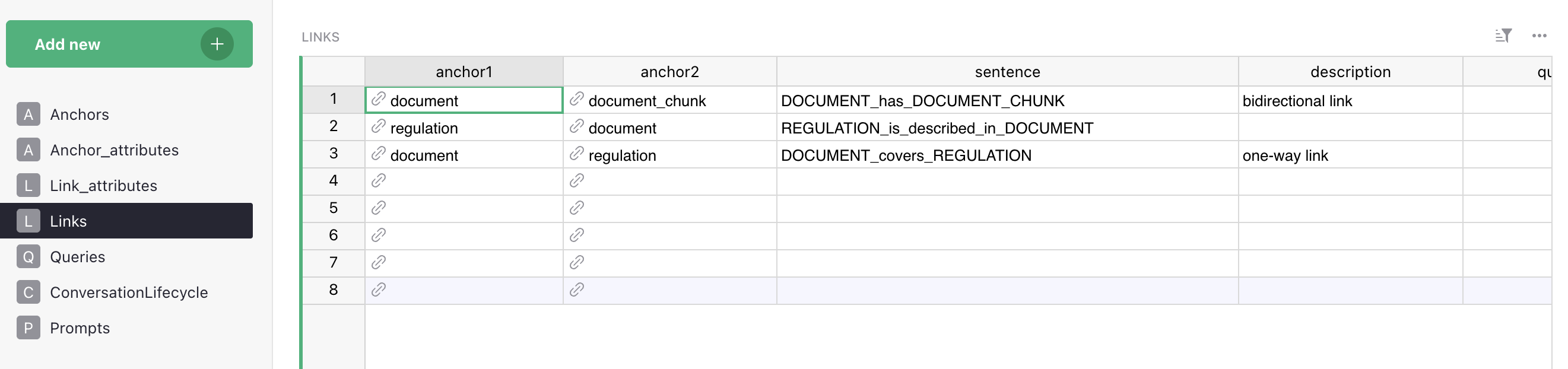
Go to Grist → Data Model → Links. Each row defines one relationship type between two anchor types.
Step 2 — Set the Source and Target Anchors
In the Anchor1 and Anchor2 columns, set the source and target of the relationship. The relationship runs from Anchor1 to Anchor2.
For Product → belongs_to → Category:
- Anchor1:
Product - Anchor2:
Category
Choose the direction that matches the most natural traversal direction for the questions users will ask. If users ask “which category does this product belong to?”, the traversal goes from Product to Category — so Product is Anchor1.
Step 3 — Set the Edge Label
The Sentence column contains the edge label as it will appear in Memgraph — the relationship type used in Cypher queries. Vedana stores sentence literally; there is no case normalisation in the code. The canonical convention used in Links, Queries and elsewhere in this documentation is ANCHOR1_verb_ANCHOR2 (anchor names UPPER-cased, verb in snake_case, e.g. PRODUCT_belongs_to_CATEGORY, PERSON_has_INTEREST). Sticking to one format makes Cypher and the playbook examples consistent.
| Anchor1 | Sentence | Anchor2 |
|---|---|---|
| product | PRODUCT_belongs_to_CATEGORY | category |
| product | PRODUCT_available_at_BRANCH | branch |
| contract | CONTRACT_signed_with_COUNTERPARTY | counterparty |
| requirement | REQUIREMENT_applies_to_PRODUCT | product |
| employee | EMPLOYEE_works_in_DEPARTMENT | department |
| document | DOCUMENT_has_DOCUMENT_CHUNK | document_chunk |
| regulation | REGULATION_is_described_in_DOCUMENT | document |
Use underscores, not spaces. The label is case-sensitive in Memgraph — whatever you write here is what you must use in Cypher queries. Keep it consistent with the naming conventions used across your model.
Avoid generic labels like related_to or connected_with. These carry no semantic meaning and make it impossible for the assistant to understand what the relationship represents.
Step 4 — Write the Description
The description explains the type of connection.
Examples:
- ‘bidirectional link’
- ‘one-way link’
Step 5 — Write the Cypher Query
The Query field contains the Cypher statement used to traverse this relationship. This is the query the assistant runs when it needs to follow this link during retrieval.
For Product → belongs_to → Category:
MATCH (p:product)-[:PRODUCT_belongs_to_CATEGORY]->(c:category)
WHERE p.product_id = $id
RETURN c.category_id, c.name
For a reverse traversal — finding all products in a category:
MATCH (p:product)-[:PRODUCT_belongs_to_CATEGORY]->(c:category)
WHERE c.category_id = $id
RETURN p.product_id, p.name, p.price
Include both traversal directions if users will ask questions from either direction. Two entries in the Links table — one for each direction — is the correct approach, not a single bidirectional entry.
Verify the query works in Memgraph Lab before saving. Run it manually after ETL with a real ID substituted for $id:
MATCH (p:product)-[:PRODUCT_belongs_to_CATEGORY]->(c:category)
WHERE p.product_id = "p-001"
RETURN c.category_id, c.name
Step 6 — Set the Link Column Names
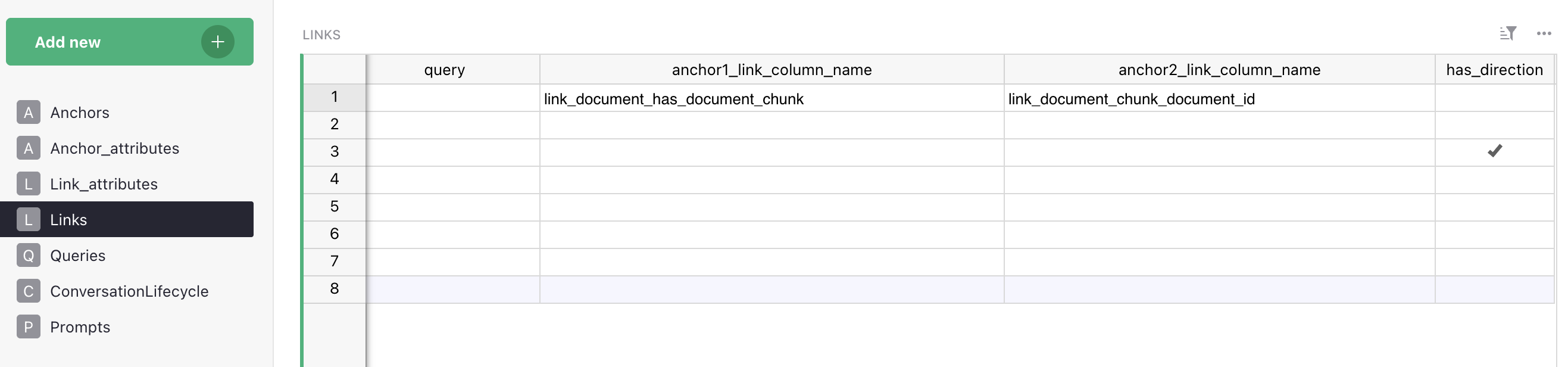
The anchor1_link_column_name and anchor2_link_column_name fields specify which column in each anchor’s data table holds the foreign key reference.
For the products table containing a category_id column:
anchor1_link_column_name:category_id(the column on the Product side)anchor2_link_column_name:category_id(the matching primary key on the Category side)
ETL uses these to resolve which rows to connect with edges. If these fields are wrong or missing, ETL will not create the edges and the link will exist in the schema but not in the graph.
Step 7 — Set Direction
Set has_direction to true for directional relationships, which is most relationships. Leave it unset or false only when the relationship is genuinely symmetric and traversal in either direction is equally valid.
When direction is set, Cypher traversal queries must follow the declared direction using ->. Queries using <- will return no results unless you have defined a reverse link.
Step 8 — Update the Data Model and Run ETL
In the Backoffice click Reload Data Model, then run ETL. After ETL completes, verify that edges were created in Memgraph Lab by traversing the relationship:
MATCH (p:product)-[:PRODUCT_belongs_to_CATEGORY]->(c:category)
RETURN p.name, c.name
LIMIT 10
If the query returns results, the link is working. If it returns nothing, check:
- That both anchor types have nodes in the graph (run a count query for each)
- That the
anchor1_link_column_namematches the exact column name in the source data table - That the foreign key values in the source column match actual primary keys in the target anchor’s data
Common Mistakes
Encoding relationships as string attributes instead of links. Storing Product.category = "Electronics" as a plain string works for simple filtering but prevents traversal. If Category has its own attributes or connects to other entities, it should be an anchor with a proper link.
Using generic edge labels. Labels like related_to, has, or connected carry no semantic meaning. The assistant uses edge labels to understand what a relationship means. Use specific verb phrases: belongs_to, regulated_by, available_at.
Mismatched column names. If anchor1_link_column_name does not exactly match the column header in the source data table, ETL will not create the edges. Column names are case-sensitive.
Missing the reverse direction. If users will ask questions that traverse a relationship in both directions — “which products are in this category?” as well as “which category does this product belong to?” — define both directions explicitly as separate entries in the Links table.
Circular links without clear semantics. A relationship like Category → parent_of → Category (for hierarchical categories) is valid but needs careful query design to avoid infinite traversal loops. If you model hierarchical or recursive relationships, make sure the Cypher queries include depth limits.