Attributes
An attribute is a typed property attached to an anchor (or link). If anchors describe what exists, attributes describe what we know about it — the specific, queryable data that describes each entity.
For a Product anchor attributes might be: name (string), price (float), currency (string), in_stock (bool). For Branch: address, city, opening_hours. For Contract: start_date, end_date, counterparty.
Attributes are what makes precise filtering possible. Without them, Vedana behaves like basic RAG: it can retrieve a paragraph mentioning a product’s price but can’t filter products by price.
Where they’re defined
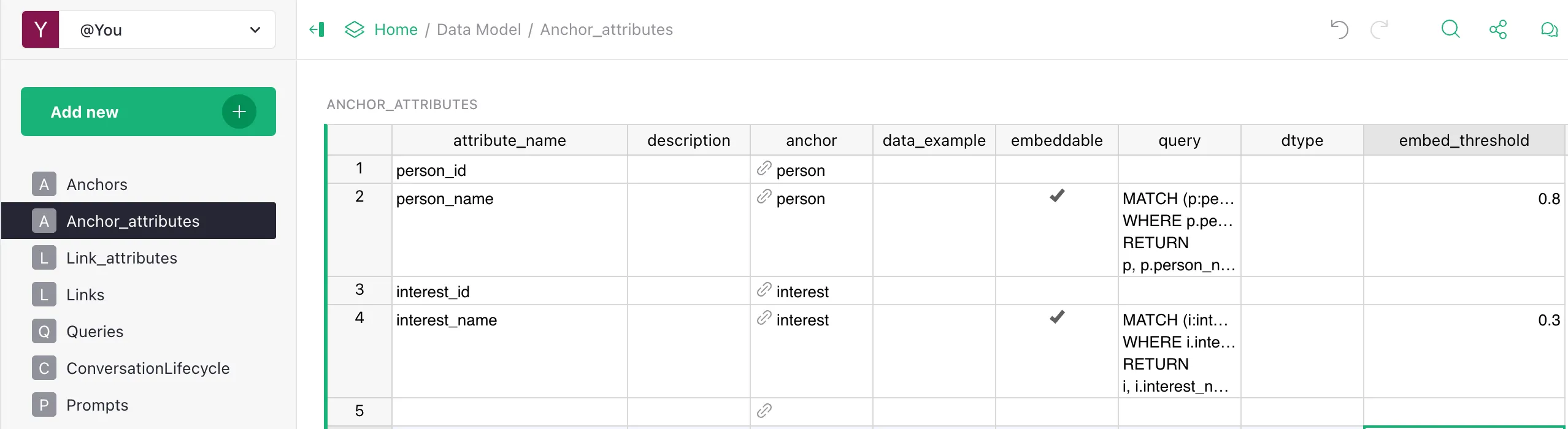
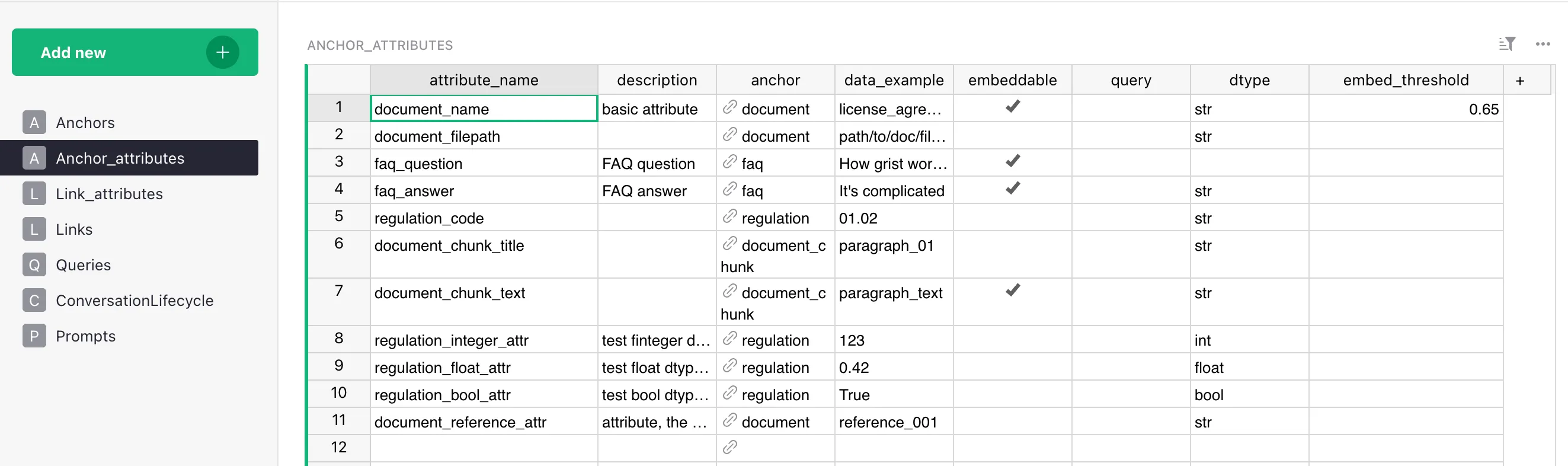
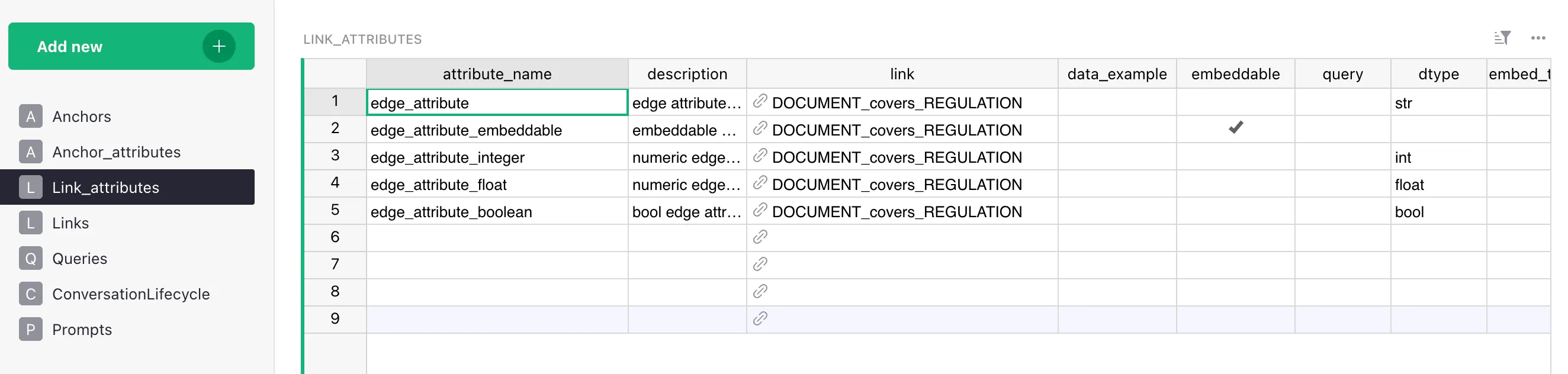
In Grist, attributes live in two tables:
Anchor_attributes— properties attached to an anchor (a graph node).Link_attributes— properties attached to a link (a graph edge).
Both have the same column structure; the only difference is what they’re attached to.
Fields
| Field | Type | Description |
|---|---|---|
| attribute_name | str | System name — lowercase, no spaces, must match the column name in the data. |
anchor (in Anchor_attributes) / link (in Link_attributes) | str | The owner of the attribute. Note: the column is named anchor in Anchor_attributes and link in Link_attributes. |
| description | str | Human-readable description — goes into the LLM context. |
| data_example | str | A real example value (999.00, "Vilnius", true). |
| embeddable | bool | Whether to build an embedding of this field for semantic search. |
| embed_threshold | float | Minimum similarity for a result to be returned (0..1). Only applies if embeddable=true. If the cell is empty, DataModel.get_anchors falls back to 1.0 (effectively “never match”); RagPipeline.__init__ also defines a pipeline-level fallback threshold=0.8 used when no per-attribute threshold is registered for a (label, property) pair. Always set this explicitly for embeddable attributes — the doc-level recommendation is to start around 0.7 and tune. |
| query | str | Cypher to fetch this attribute (or its “owner” node). |
| dtype | str | Hint string. Stored as-is in dm_*_attributes (steps.py:90, 109). Used by the LLM in the data-model description, and — only for str, int, float, bool — by vedana_core.utils.cast_dtype for value coercion in Grist providers. There is no enum validation of the string itself; other common values (date, datetime, enum, url, file) are hints to the LLM only and pass through Grist providers as-is. Make sure it matches the actual stored format. |
What you get in the graph
After ETL, attributes become properties on the node:
(:product {
    id: "p-001",
    product_id: "p-001",
    name: "Laptop Pro",
    price: 999.00,
    currency: "EUR",
    in_stock: true
})
The properties on the node are exactly the attributes you declared. If a column exists in Grist but isn’t declared in Anchor_attributes, it won’t appear on the node and can’t be queried.
Embeddable attributes
Attributes with embeddable=true are vectorised at ETL time. Their values are stored as embeddings in pgvector (rag_anchor_embeddings or rag_edge_embeddings), making semantic search through vector_text_search available.
Embeddable suits:
- human-readable text fields where meaning-based search matters:
name,description,title,interest_name,category_label; - unstructured content: chunk text in documents, FAQ questions.
Embeddable doesn’t suit:
- identifiers (
product_id,sku) — exact match is needed; - numeric values (
price,quantity) — filters/comparisons are needed; - boolean flags (
in_stock); - structured codes (
category_code: "A12-B").
embed_threshold
Controls how close a query must be to a stored value for the result to be returned.
- too low (
0.5) → many irrelevant results; - too high (
0.95) → misses valid matches; - choose a starting value based on the attribute kind (canonical table in Tuning Embeddings & Thresholds), then tune through evaluation:
| Attribute kind | Start |
|---|---|
| Names / exact identifiers | 0.75–0.85 |
| Descriptions | 0.65–0.75 |
| Document chunks | 0.50–0.65 |
| FAQ | 0.70–0.78 |
The threshold can be set per attribute — useful when some fields require precision (names, SKUs) and others tolerate fuzziness (descriptions). See Tuning Embeddings & Thresholds for the full tuning loop.
dtype
dtype must exactly match how the data is stored in Grist. If the price column contains "999.00" (a string with quotes) but you declared dtype=float, ETL will either fail or write the value incorrectly. Check the actual data before declaring a type.
dtype is stored as a free string in dm_*_attributes (no enum validation). It has two roles, and only a few values actually trigger value coercion:
- Coerced by
vedana_core.utils.cast_dtypewhen Grist providers read the value:str,int,float,bool— value is cast to the matching Python type.
- Hint-only (LLM uses it in the data-model description, but no automatic cast / validation):
date,datetime— ISO 8601 recommended, but stored as the original string;enum— a value from a fixed set;url— http(s) link;file— file (linked to storage);- any other string you put here.
In practice this means: for date/datetime/enum/url/file the value lands in Memgraph in the exact form Grist returned it. If you need a parsed Python date/datetime downstream, do the parsing in a custom ETL step. Cypher-level filtering on these attributes still works because Memgraph stores them as strings.
query
The query field is the Cypher used to fetch the attribute from the graph. Required for any attribute that should be directly retrievable.
A missing or empty query is one of the most common causes of vague or incomplete answers: the assistant knows the attribute exists (it sees the description in the context) but can’t reliably pull its value from the graph.
Example for product.price (Vedana stores the literal id property on every node, set by ensure_memgraph_node_indexes and pass_df_to_memgraph — steps.py:485; a natural-key column like product_id is also present if it was declared as an attribute on the anchor):
MATCH (p:product) WHERE p.id = $node_id RETURN p.price AS priceAttribute vs Link
The most common modeling question: make a value an attribute or a link?
Use string attribute when the value is scalar — a number, a date, a string, a flag — and exists only to describe this entity.
Examples: Product.price, Branch.opening_hours, Contract.end_date.
Use link when the value references another entity that has its own attributes or appears in other relationships.
For example, Product.category_id → categories table. If categories have their own properties (description, parent_category) or appear in other relationships (Category → regulated_by → LegalRequirement), this is a link, not an attribute.
Attribute: Product.category = "Laptops"  (just a string)
                     ↓
Link:      Product → belongs_to → Category  (full entity with attributes)
The practical difference:
- String attribute lets you filter products by category name.
- Link to a Category anchor lets you traverse from products to categories and to everything the category is connected with: regulatory documents, sibling categories, products of related categories.
The more the target entity participates in the graph, the stronger the case for a link.
How it affects the assistant
The full set of attribute definitions goes into the LLM context at query time. This lets it:
- generate valid Cypher filters (
WHERE p.price < 500); - apply numeric comparisons correctly;
- avoid inventing fields that don’t exist in the schema.
If an attribute isn’t declared — it doesn’t exist for the assistant, even if the data is in the graph.
Checklist before adding an attribute
- The data column exists and is populated.
-
dtypematches the actual format. -
embeddableis set correctly (only for text). -
embed_thresholdis set (if embeddable). -
queryworks — verified in Memgraph Lab. - You’ve considered whether this should be a link.
Common mistakes
dtypedoesn’t match the data. ETL will fail or write values incorrectly.embeddable=truefor numbers/SKUs. Useless — embedding “999.00” carries no meaning.- Empty
query. The assistant knows the attribute exists but can’t fetch it. - Description that’s too generic. “Property of product” — the LLM won’t know when to use it.
- One attribute “does it all”. Don’t put JSON in one column if queries on it are important — split it into separate attributes.