Queries (playbook)
The Queries table is Vedana’s playbook. It describes exactly how the assistant should answer typical questions: which tool to call first, with what parameters, what to do with the result, which tool to call next.
If the data model describes what exists, then Queries describe how to use it.

Fields
| Field | Description |
|---|---|
| query_name | A short scenario name or question pattern (Who likes <interest>?, Give product information by SKU). |
| query_example | A step-by-step instruction: what to do, in what order, with what parameters, how to handle the result. |
Why a playbook is needed
Without one, the LLM picks a tool itself. That works, but:
- it might pick a sub-optimal tool (vector search instead of Cypher);
- it can mix retrieval strategies;
- answers are “usually right” but with no guarantee and not always in the same format.
With a playbook, behaviour becomes structured, constrained, and auditable. The same question is always handled the same way.
How to write a scenario
query_example must be concrete and step-by-step. Compare:
❌ Bad (generic problem statement):
Find the interest and return the people connected to it.✅ Good (a sequence of tool calls with parameters):
1) Use vector_text_search to get the interest node:
   vector_text_search(label="interest", property="interest_name", text='<interest>')
   → retrieve "node_id"

2) Use Cypher to get all persons connected via PERSON_has_INTEREST:
   MATCH (p:person)-[:PERSON_has_INTEREST]->(i:interest)
   WHERE i.id=$node_id
   RETURN p.person_name, i.interest_name

3) Format the answer as: "<interest> is liked by: <name1>, <name2>, ..."
The LLM follows instructions literally. The more precise the steps, the more stable the behaviour.
Structure of a good scenario
Each scenario typically contains:
- When to apply — describe the use case (“document-related questions”, “product compatibility checks”).
- Search strategy — vector → Cypher, Cypher → vector, or a combination.
- Concrete tool calls — with parameter names and where they come from.
- Answer assembly — how exactly the final text is built.
How Queries reach the LLM
For each request:
-
DataModel.get_queries()reads rows fromdm_queries. -
(Optional) The data model filtering step picks relevant
query_idsfor the question. -
to_text_descr()renders the chosen queries into the## Типичные вопросы:section of the system prompt usingdm_query_descr_template:- {query.name} {query.example} -
The LLM uses this as guidance when choosing tools.
How to update the playbook
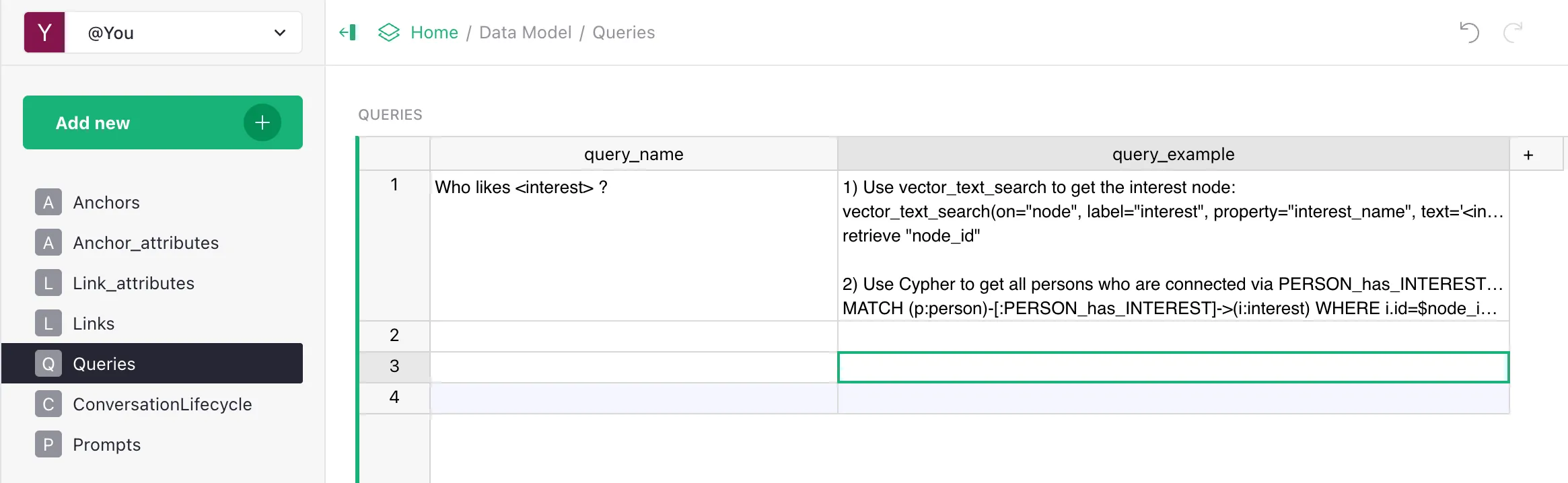
- Open Grist > Data Model > Queries.
- Create a row:
query_name— the scenario name.query_example— the step-by-step instruction.
- In the backoffice → ETL run
data_model_steps(or the “Refresh Data Model” tab). - Verify via evaluation that existing scenarios didn’t break.
The playbook applies right after refresh — no code redeploy required.
Versioning
Because Queries live in Grist, you have built-in change history through Grist (revision log). For production scenarios we recommend:
- keeping separate Grist documents for dev / staging / prod (
GRIST_DATA_MODEL_DOC_ID); - describing every playbook change in a separate ticket / changelog;
- having an evaluation on a golden dataset that runs before and after changes.
Examples from a real playbook
E-commerce: “Find products of category X cheaper than Y”
1) Cypher: get the category nodes:
   MATCH (c:category) WHERE c.category_name = "<category>" RETURN c.id

2) Cypher: get linked products with the price filter:
   MATCH (p:product)-[:PRODUCT_belongs_to_CATEGORY]->(c:category)
   WHERE c.id = $cat_id AND p.price < $max_price
   RETURN p.product_name, p.price ORDER BY p.price ASC

3) Format: list "<name> — <price> EUR".
Documents: “What does the policy say about returns?”
1) Vector search over document_chunks:
   vector_text_search(label="document_chunk", property="content", text="<user question>")

2) Get the parent document:
   MATCH (d:document)-[:DOCUMENT_has_DOCUMENT_CHUNK]->(c:document_chunk)
   WHERE c.id IN $chunk_ids RETURN d.title, d.url

3) Format: answer based on the chunks + a link to the document.
Smalltalk
If the question is not domain-related (greeting, thanks, farewell):
- DO NOT call tools.
- Reply briefly in a friendly tone.
(It’s worth describing such scenarios too, so the assistant doesn’t call tools unnecessarily.)
What’s next
- Playbook concept — the theory.
- Customizing Prompts — overriding templates.